



No Result
View All Result
Thursday, 14 May 2026
  • Login
Systems Integration Asia
  • Home
  • COMMERCIAL AV
    • All
    • NEWS
    • SOLUTIONS
    • INDIA
    • CASE STUDIES
    • FEATURE
    • VIDEOS
    G2E Asia + Asian IR Expo 2026 Now Open

    G2E Asia + Asian IR Expo 2026 Now Open

    Visionary Expands 5 Series Lineup with New E5000 AV-over-IP Encoder

    Visionary Expands 5 Series Lineup with New E5000 AV-over-IP Encoder

    Peavey Introduces Impulse Pendant Speaker Series for Commercial Installations

    Peavey Introduces Impulse Pendant Speaker Series for Commercial Installations

    AtlasIED Announces Partnership with NETGEAR AV

    AtlasIED Announces Partnership with NETGEAR AV

    G&D and CT Square Establish Joint Venture to Expand Mission-Critical Control Room Technology Across India

    G&D and CT Square Establish Joint Venture to Expand Mission-Critical Control Room Technology Across India

    NETGEAR Delivers End-to-End Network Confidence with Comprehensive Premium Support and Professional Services Portfolio

    NETGEAR Delivers End-to-End Network Confidence with Comprehensive Premium Support and Professional Services Portfolio

    SDVoE Alliance Expands AV-over-IP Ecosystem with WaveSplitter Partnership

    SDVoE Alliance Expands AV-over-IP Ecosystem with WaveSplitter Partnership

    NEXT Audiogroup Targets Smarter Multi-Zone Installations with New AD3000 DSP Amplifier

    NEXT Audiogroup Targets Smarter Multi-Zone Installations with New AD3000 DSP Amplifier

    Jands and Meyer Sound Unite to Power the Next Era of Professional Audio

    Jands and Meyer Sound Unite to Power the Next Era of Professional Audio

    Trending Tags

    • PALM
    • PALM Expo
    • PALM Sound & Light Awards
    • El Palmeral Resort
    • retail
    • Retail Asia Expo
    • Coretronics
    • Language interpretor
    • Margareta Anastasiaa
    • Coretronic
    • Retail Technology
    • Ultra-Stretch
    • miniature electret microphone
    • Beating Retreat Ceremony
    • smart retail solutions
    • Retail Digital Signage Expo
  • SI ASIA
    • Digital Magazine
    • SI Asia E-newsletter
    • SI India E-newsletter
  • Events
  • Subscribe
  • Contact Us
  • Home
  • COMMERCIAL AV
    • All
    • NEWS
    • SOLUTIONS
    • INDIA
    • CASE STUDIES
    • FEATURE
    • VIDEOS
    G2E Asia + Asian IR Expo 2026 Now Open

    G2E Asia + Asian IR Expo 2026 Now Open

    Visionary Expands 5 Series Lineup with New E5000 AV-over-IP Encoder

    Visionary Expands 5 Series Lineup with New E5000 AV-over-IP Encoder

    Peavey Introduces Impulse Pendant Speaker Series for Commercial Installations

    Peavey Introduces Impulse Pendant Speaker Series for Commercial Installations

    AtlasIED Announces Partnership with NETGEAR AV

    AtlasIED Announces Partnership with NETGEAR AV

    G&D and CT Square Establish Joint Venture to Expand Mission-Critical Control Room Technology Across India

    G&D and CT Square Establish Joint Venture to Expand Mission-Critical Control Room Technology Across India

    NETGEAR Delivers End-to-End Network Confidence with Comprehensive Premium Support and Professional Services Portfolio

    NETGEAR Delivers End-to-End Network Confidence with Comprehensive Premium Support and Professional Services Portfolio

    SDVoE Alliance Expands AV-over-IP Ecosystem with WaveSplitter Partnership

    SDVoE Alliance Expands AV-over-IP Ecosystem with WaveSplitter Partnership

    NEXT Audiogroup Targets Smarter Multi-Zone Installations with New AD3000 DSP Amplifier

    NEXT Audiogroup Targets Smarter Multi-Zone Installations with New AD3000 DSP Amplifier

    Jands and Meyer Sound Unite to Power the Next Era of Professional Audio

    Jands and Meyer Sound Unite to Power the Next Era of Professional Audio

    Trending Tags

    • PALM
    • PALM Expo
    • PALM Sound & Light Awards
    • El Palmeral Resort
    • retail
    • Retail Asia Expo
    • Coretronics
    • Language interpretor
    • Margareta Anastasiaa
    • Coretronic
    • Retail Technology
    • Ultra-Stretch
    • miniature electret microphone
    • Beating Retreat Ceremony
    • smart retail solutions
    • Retail Digital Signage Expo
  • SI ASIA
    • Digital Magazine
    • SI Asia E-newsletter
    • SI India E-newsletter
  • Events
  • Subscribe
  • Contact Us
No Result
View All Result
Systems Integration Asia
No Result
View All Result
Home COMMERCIAL AV FEATURE

How to Bring HDMI or SDI Sources into Zoom, Teams and Other Conferencing Software

10/12/2021
in FEATURE
0
How to Bring HDMI or SDI Sources into Zoom, Teams and Other Conferencing Software
0
SHARES
Share on FacebookShare on Twitter

Corporate enterprises, schools, and government agencies worldwide continue to implement new remote or hybrid working and learning approaches. This has led to surging demand for virtual meetings and classes using web-based conferencing or distance learning tools such as Zoom, Microsoft Teams, Skype, GoToMeeting, Google Meet, and Panopto.

Users of web-based conferencing or collaboration software often want to incorporate live HDMI or SDI video sources into their online meetings. Many attendees wish to use a higher-quality camera (such as a dedicated video camera or video-capable DSLR camera) to provide better-looking video than a standard webcam, while other users may need to share content from a different computer or another video source. To do this, users need a reliable, low-latency video capture device that is compatible with their computer and operating system, such Microsoft Windows or macOS.

This tutorial walks through how to bring an HDMI or SDI signal from a video camera into Zoom using a Magewell USB Capture or USB Capture Plus external video capture device. The workflow for bringing such sources into other software applications is similar.
This tutorial assumes that you have already installed your preferred web conferencing software on your computer and (if you are hosting the meeting) created an account for it.

Steps:
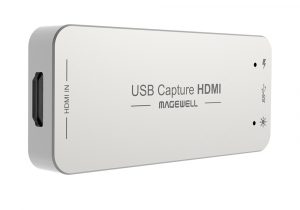
1. Connect the Magewell USB Capture or USB Capture Plus device to your computer with the included USB 3.0 cable. The devices are plug-and-play, so no manual driver installation is required; your computer should automatically recognize it. (See the diagram in step 2).

2. Connect your video camera to the USB Capture or USB Capture Plus device with an HDMI or SDI cable (the choice of HDMI or SDI will depend on the connectivity offered by your camera). Once the camera is turned on, the Magewell device will automatically detect the resolution and frame rate of the signal being provided by the camera.
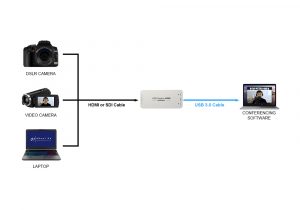
If you are using a USB Capture Plus model, you can also connect a display to the loop-through connection of the Magewell device if you want additional full-screen monitoring of the camera signal.

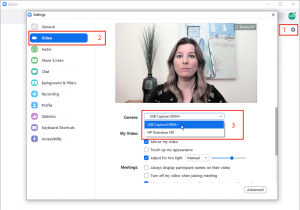
3. Run the Zoom software and log in to your account. Open the Settings panel (accessible through your account icon) and click Video in the left menu. The Magewell device will be detected automatically by the software. Choose it from the Camera drop-down list, and you will see a preview of the video from your camera. If you want to maximize your quality and you have sufficient bandwidth, ensure that the Enable HD option is checked in this panel.
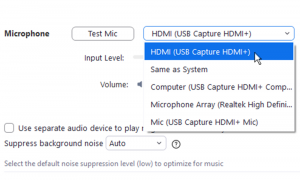
4. On the Audio settings page, you can choose your desired speakers and microphone. If you want to use audio from your HDMI or SDI source rather than a separate microphone, select the Magewell device in the Microphone pull-down menu.
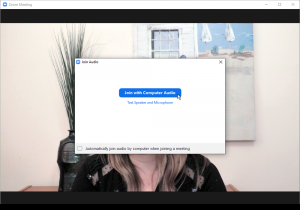
5. After choosing your video and audio device, you can return to the Zoom home page to start a new meeting or join an existing one. When you start or join the meeting, the audio/video confirmation window will appear, enabling you to confirm you have selected the correct sources. Click “Join with Computer Audio” when you are ready.
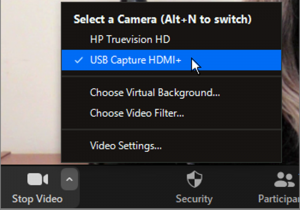
6. If you are using multiple video sources (for example, using your computer’s webcam for one camera angle and the Magewell capture device for a second camera angle or wired screen share), you can easily switch between them during the conference. Simply click the up-pointing arrow next to the “Stop Video” icon at the bottom of the Zoom screen and choose on the new source you wish to make live.
If you are using a desktop computer with PCI Express slots and want to bring in multiple HDMI or SDI sources, Magewell’s Pro Capture internal PCIe cards are available in multi-channel models such as the Pro Capture Quad HDMI. When using a multi-channel Magewell card, you can switch between the input channels within Zoom using the same method above.

Magewell

Tags: HDMIMicrosoft TeamsZoomConferencing SoftwareSDI
Previous Post

New AIMS Education Working Group Launches to Improve Education and Training for IP Media Professionals

Next Post

Crestron’s Go-to-market Approach Helps it Win Strategic Customers

Related Posts

SIIA 2026: The Indian AV Beacon Beckons
INDIA

SIIA 2026: The Indian AV Beacon Beckons

by Ram Bhavanashi
17/04/2026
Spandan: A Symphony of Light, Water and Storytelling
INDIA

Spandan: A Symphony of Light, Water and Storytelling

by Ram Bhavanashi
17/04/2026
PPDS’ Suzanne Racz Shares Career Advice for the Next Generation of Women in AV
NEWS

PPDS’ Suzanne Racz Shares Career Advice for the Next Generation of Women in AV

by elissa@spinworkz.com
12/03/2026
Are VR Headsets Bound for the Dustbin?
COMMERCIAL AV

Are VR Headsets Bound for the Dustbin?

by elissa@spinworkz.com
04/03/2026
Workplace 3.0: Redefining Spaces into Experiences
COMMERCIAL AV

Workplace 3.0: Redefining Spaces into Experiences

by elissa@spinworkz.com
02/03/2026
Next Post
Crestron’s Go-to-market Approach Helps it Win Strategic Customers

Crestron's Go-to-market Approach Helps it Win Strategic Customers

LATEST NEWS

G2E Asia + Asian IR Expo 2026 Now Open

G2E Asia + Asian IR Expo 2026 Now Open

13/05/2026
Visionary Expands 5 Series Lineup with New E5000 AV-over-IP Encoder

Visionary Expands 5 Series Lineup with New E5000 AV-over-IP Encoder

13/05/2026
Peavey Introduces Impulse Pendant Speaker Series for Commercial Installations

Peavey Introduces Impulse Pendant Speaker Series for Commercial Installations

13/05/2026
AtlasIED Announces Partnership with NETGEAR AV

AtlasIED Announces Partnership with NETGEAR AV

12/05/2026
Systems Integration Asia

Systems Integration Asia (SI Asia) is a trade publication dedicated to the professional audiovisual industry, technology managers and end-users in key vertical markets such as education...

About Us

Categories

  • CASE STUDIES
  • FEATURE
  • INDIA
  • LATEST
  • SOLUTIONS
  • VIDEOS

Browse by Tag

Allen & Heath Analog Way Asia Atlona Audinate AV Stumpfl barco biamp Bosch COMM-TEC Asia Limited Crestron Dataton Digital Projection Displays dnp dnp denmark Epson ESCO Extron Harman IBM IHSE InfoComm Installation installations Kramer Leyard Muxlab NanoLumens NEC Philips Powersoft QSC Renkus-Heinz RGBlink Samsung security Shure Sony Symetrix tech talk training Tripleplay Visionary Solutions Wyrestorm

Recent Posts

  • G2E Asia + Asian IR Expo 2026 Now Open
  • Visionary Expands 5 Series Lineup with New E5000 AV-over-IP Encoder
  • Peavey Introduces Impulse Pendant Speaker Series for Commercial Installations

Copyright © 2023 Systems Integration Asia . All rights reserved. Privacy Policy

Welcome Back!

Login to your account below

Forgotten Password?

Retrieve your password

Please enter your username or email address to reset your password.

Log In
No Result
View All Result
  • Home
  • COMMERCIAL AV
  • SI ASIA
    • Digital Magazine
    • SI Asia E-newsletter
    • SI India E-newsletter
  • Events
  • Subscribe
  • Contact Us

Copyright © 2023 Systems Integration Asia . All rights reserved. Privacy Policy